Guides
OCR Playground
Comparing vision models with high-detail documents.
OCR Playground
The OCR Playground is a sandbox for testing one supported model at a time against your own documents.
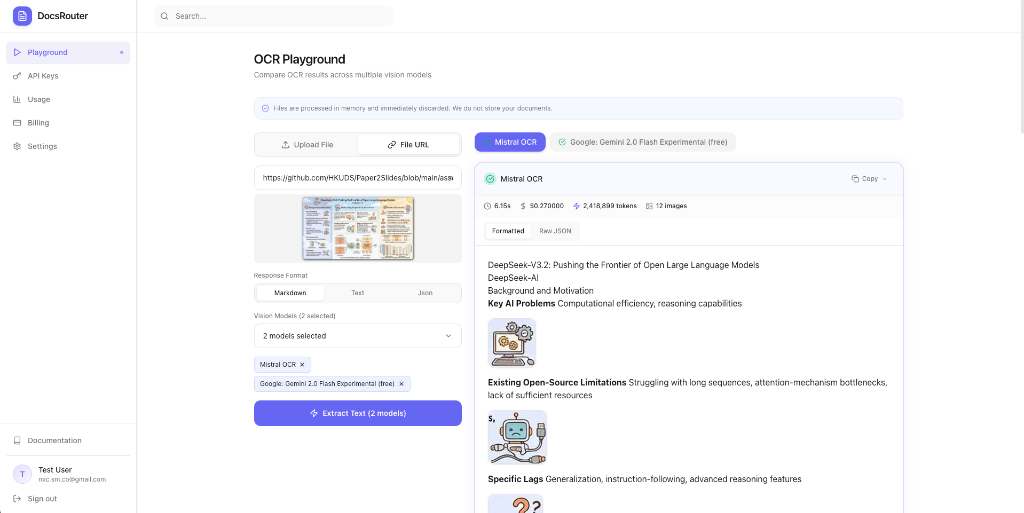
The Experience
Use the playground to inspect output before integrating the API. Results vary by document and model; the playground is not a published benchmark.
1. Seamless Input
We started by navigating to the Playground and switching to the File URL tab. DocsRouter makes it incredibly easy to process remote assets by simply pasting a link.
2. Select a Model
Choose one model returned by the catalog. Repeat the request with another model if you want to compare results.
3. Real-Time Results
Upon clicking Extract Text, the platform sends the document to the selected model:
- Structured Output: View the returned markdown, plain text, and parsed blocks when present.
- Visual Context: The playground displays the source image alongside the extracted markdown, allowing for immediate verification of accuracy.
Technical Highlights
- Formatting: The response exposes model-returned markdown plus derived text and structured blocks.
- Cost visibility: The result includes processing time and charged cost. Token details appear only when the provider reports them.